


When starting or marketing a food truck business, one of the most important things you can do is bring a strong visual element to the presentation. This is particularly easy to do with a food truck mockup, especially a free PSD (Photoshop Document) mockup. These tools help you visualize your branding, menu, and other elements to avoid costly mistakes in the real world. In this article, we will discuss the important elements of a food truck mockup, defined a free food truck mockup PSD, identify who can use one, and outline the ways to use a PSD in Photoshop.

How to Mockup a Food Truck?
When you mockup designs for food trucks, you create a visually appealing presentation that is at least somewhat realistic and creates a digital version of that truck. This involves a lot of creativity and the use of graphics to design the truck body, including the cutouts for the wheels and windows, and then including a logo, a bright color scheme, and the fonts and other decorative artistic elements that may be included.
The most important piece of the process is a food truck mockup, especially one created in Photoshop. These mockup designs help you realize your design in a substantially realistic way as they are wizarded to offer different real-world surfaces such as a metal surface for a panel. With these, you can create a design that is usable for your restaurant.

The overall development of a mockup involves the following:
Selecting the mockup that lends itself to your truck design style (vintage, trailer, etc.)
Collecting your content for placement (graphics for logos and menus)
Inserting your design into the mockup
Balancing your elements and shadows to provide a full visual for the images.
When a mockup is designed well, you will have a good representation of the food truck style that will be visible on the street. This will help you refine elements of your design before any costly printing or painting of the design elements.
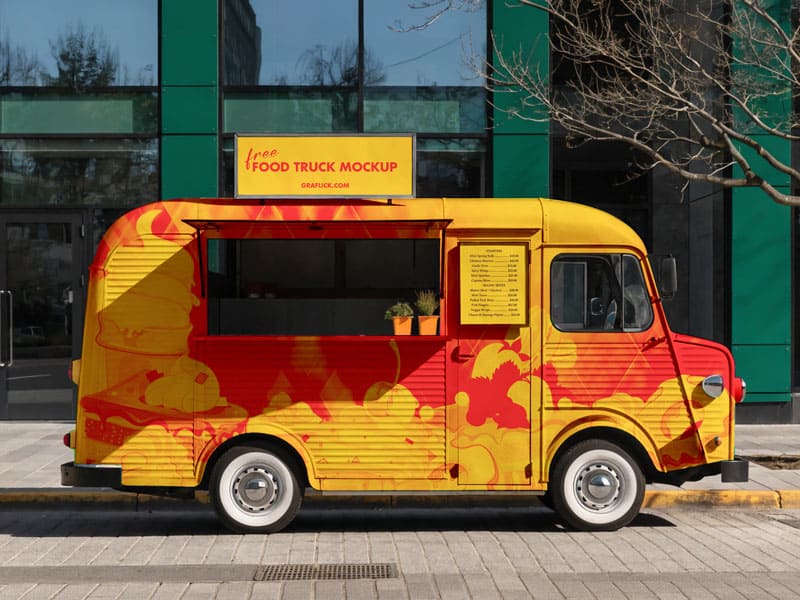
Utility of The Free Food Truck Mockup PSD:
With Free Food Truck Mockup PSD, one is given the ability to utilize an editable food truck template in Adobe Photoshop to create brand new designs. PSD files are Photoshop documents that allow for editing and re-editing of documents as many times as needed.
Most of the services these mockups provide include:
Branding visualization: Check out how your logo and colors blend in perfectly to the truck.
Presentation to clients: Designers are able to create real images for their clients in their projects.
Marketing images: Mockups serve a purpose in generating images for social media, websites, and portfolios.
Design changes testing: Mockups allow for easy variation in a design without the need for a physical change.
A hallmark of these mockup PSD files is the ability to use smart objects. Smart objects enable designers to perform quick edits in a design. The PSD mockups then adjust in a seamless manner to improve lighting and textures of the new design.

The Ideal Customer
A wide array of clients can utilize the Free Food Truck Mockup PSD.
- Food Truck Entrepreneurs
For those who are just starting a food truck business, these mockups give a visualization without the need to spend so much money repainting or wrapping the truck. It allows for playing around design and brand recognition. - Graphic Designers
Mockups are essential for designers to exhibit their talents. Showing clients the flat designs without any pictorial representation is as good as not presenting the design. - Marketing Professionals
Marketers can make mockups for promotional displays, advertising on social media, etc. Well before the food truck even exists physically. - Students and Creatives
These mockups can help design students and hobbyists improve branding and presentation skills, or expand their portfolios. - Agencies and Freelancers
Mockups can help agencies that associate with food businesses, as they can present polished, realistic ideas and win clients.
How to Use Free Food Truck Mockup PSD in Photoshop (Step-by-Step)
Even for beginners, working on food truck mockups in Photoshop is easy. Just follow these steps:
Step 1: Download and Open the PSD File.
Download food truck mockups PSD from reputable design sites and open them in Photoshop. You should see a layered file with multiple folders.
Step 2: Find the Smart Object Layer.
Find labels – ‘Your Design Here’, ‘Smart Object’, or ‘Replace Me’. These will be your guides to where you will upload your design.
Step 3: Edit the Smart Object.
Do a double-click on the smart object layer thumbnail. This will open a new window where you can see the placeholder design.
Step 4: Insert Your Design.
In the new window, you should drag or paste your design (logo, artwork, etc.). You need resize and reposition to ensure that they fit inside the border.
Step 5: Saving and Applying Changes
To save the smart object, press Ctrl + S (Windows) or Cmd + S (Mac). After saving, close the smart object window. When you return to the main mockup file, your design is automatically going to appear on the food truck.
Step 6: Customizing Colors and Effects
Mockups typically help you edit color, shadow, reflection and background. You can change the elements to suit your brand or presentation.
Step 7: Export the Image
You can go to File > Export > Export As and choose JPEG or PNG to export the mockup. Select the high resolution option to ensure the best quality.

Conclusion
Mocking up your food truck designs on PSDs food truck mockups is quick and affordable. As an entrepreneur, designer, or marketer, quality mockups help you experiment, refine, and confidently demonstrate your designs. Incorporating Photoshop mockups into your workflow will help you create realistic previews quick. You will save time and improve your decision making.
